A frame at every scene change
We grab an image whenever something changes — a new slide, a new shot — and skip the tiny movements. Prefer a fixed count? Pick 9, 36 or 81 frames.
Feed your AI with video
Paste a link or upload a file. In a few minutes you get screenshot sheets with timestamps and a transcript of everything that’s said. Hand them to ChatGPT, Claude or Gemini and your AI can finally “watch” the video. Free, no sign-up.
Results expire in 2 hours.
How to use it: copy the text, paste it into the chat, then drag or paste the sheets below (each one has a “Copy image” button).
How it works
Most AI chats can’t open a video link, but they’re great with text and images. So that’s what we turn your video into.
From YouTube, TikTok, Instagram, Facebook, X or Vimeo — or upload a file from your computer.
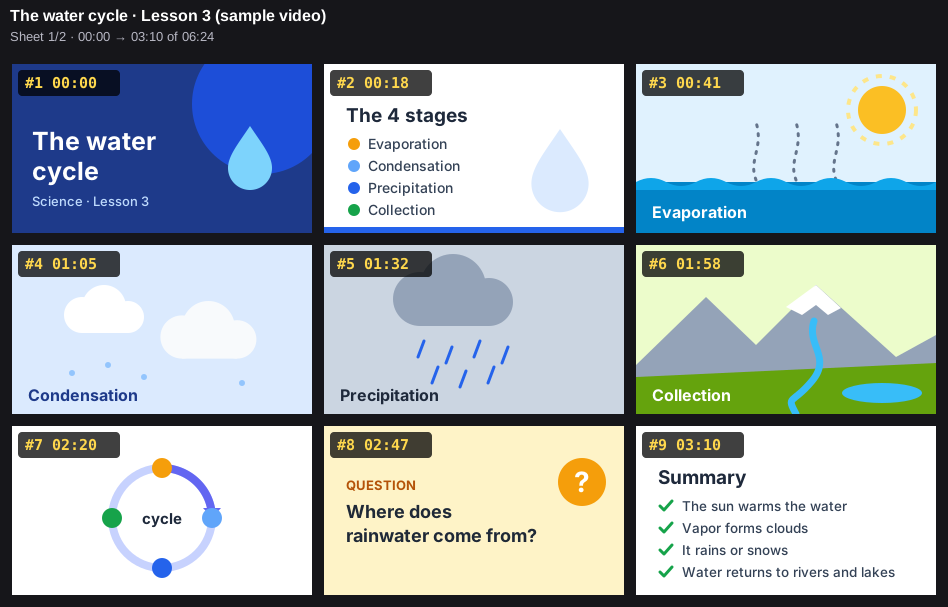
One frame at every scene change, laid out on 3×3 sheets with a number and a timestamp, plus the speech transcribed in full sentences.
Copy the text, paste the sheets into the chat and ask away: summaries, notes, analysis, quotes with the exact minute.
Example
A sheet of frames plus the matching text: every yellow label lines up with a line of the story.
Features
We grab an image whenever something changes — a new slide, a new shot — and skip the tiny movements. Prefer a fixed count? Pick 9, 36 or 81 frames.
We use human-written subtitles when they exist; otherwise we transcribe the audio. The language is detected automatically, even when a video mixes several.
Meeting recordings, lectures, videos from your phone: mp4, mov, webm, mkv or avi up to 500 MB. We never store the file name.
Nine frames per sheet, so your AI needs just a few sheets instead of hundreds of images. Lower costs, faster answers.
Sheets, frames and text in a single file to keep or share. Every sheet can also be copied with one click.
Connect ClipsForAI to your AI with a key: Claude, Cursor and other MCP clients watch videos on their own — no copy and paste. Included in Premium and Enterprise.
The video is deleted as soon as it’s processed, and results expire after 2 hours. No ads, no trackers.
Who it’s for
Recorded lectures and tutorials become notes, summaries and review questions — with the minute of every topic.
Study the pacing, shots and scripts of the videos that perform: your AI breaks them down scene by scene.
With MCP or the JSON link (Premium and Enterprise), your agents read the sheets and the speech without ever opening the page.
Check what was said and shown, and when: every sentence has its timestamp, every image its number.
No plugins to install: the sheets and the text paste into any chat that accepts images.
Pricing
No credit card and no sign-up to start. You only need an account to subscribe to a paid plan.
€0forever
No account needed
€10€12/month
€120 billed yearlyBilled monthly
€24.90€29.90/month
€298.80 billed yearlyBilled monthly
Paid plans are coming soon. Daily limits reset at midnight UTC.
FAQ
The video is only used for processing: we delete it as soon as we’re done, whether it came from a link or an upload. Sheets, text and the .zip stay available for 2 hours after your request, then disappear on their own. We don’t store the names of uploaded files, and we use no ads or trackers — just one technical cookie when you start a video or log in. If you have an account, we keep your email (encrypted), a fingerprint of your password (never the password itself), your plan and the minutes used this month.
If the video has human-written subtitles, we use them. Otherwise we transcribe the audio ourselves: the language is detected automatically, even when several are spoken in the same video. The text stays in the original language. The whole video is transcribed on every plan; Premium and Enterprise add the more accurate mode.
Up to 3 minutes on the free plan, 10 minutes with Premium and 60 minutes with Enterprise. Uploaded files can be up to 500 MB.
YouTube, TikTok, Instagram, Facebook, X (Twitter) and Vimeo. Some Instagram and Facebook videos are only visible after logging in and can’t be processed. For everything else, upload the file: mp4, mov, m4v, 3gp, webm, mkv or avi.
Yes, as long as your AI accepts images: ChatGPT, Claude, Gemini and most modern chats do. Copy the text for your AI, paste it into the chat and add the sheets. The yellow labels on the sheets match the lines of the text, so your AI knows what’s shown and what’s said at every moment.
MCP (Model Context Protocol) is an open standard for connecting tools to AIs. It’s included in Premium and Enterprise: create an API key on your Account page and connect it to your AI — Claude Code or Cursor, for example. From then on, a link is all it needs to watch the video by itself, no copy and paste.
Try it with your next video: it’s free and there’s nothing to sign up for.
Paste a link